


Couch Trivia Quiz party game
4.45.00 Reviews
App Specs
- Version
- 2.7.0
- Updated On
- License
- Free
- Downloads
- 50,000+
- Developer
- Roy Solberg
- Categories
- Trivia
- Platform
- Android
Screenshots
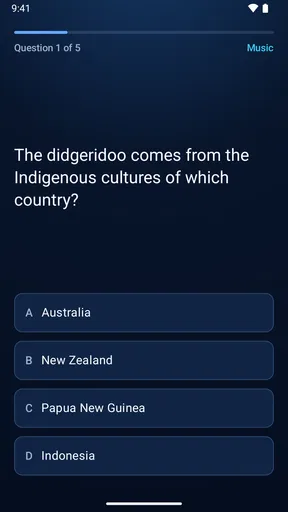
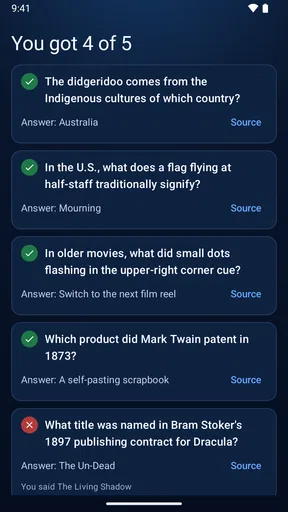
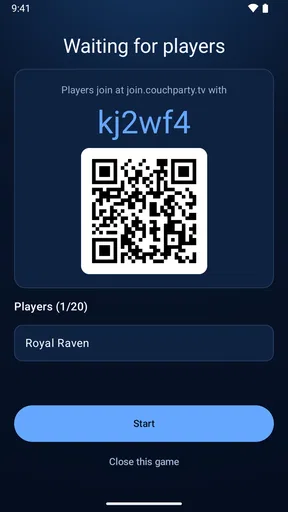
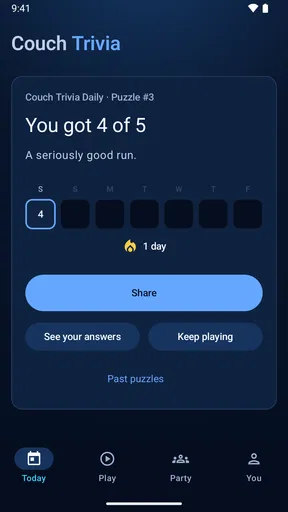
 Analysis by AppCompare
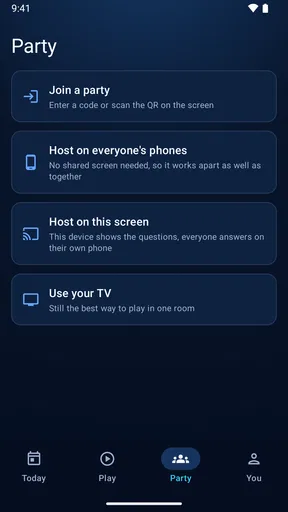
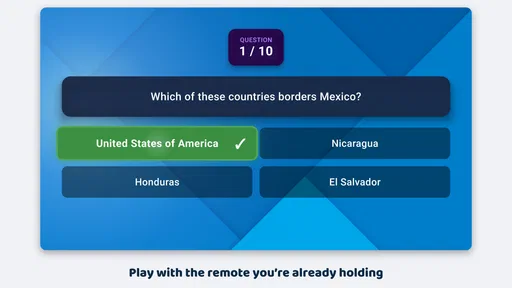
I’m drawn to trivia that makes a room feel involved rather than turning one person into the quizmaster. Couch Trivia Quiz is a party game built around that shared-screen idea: the TV provides the focus, while players join using a phone browser instead of needing a gamepad. That simple arrangement can be a real advantage when friends are already gathered and nobody wants to pass a controller around.
Its appeal is easiest to judge in two stages. During a first session, a group quiz can feel like an easy change of pace from conversation or watching something together. Whether it earns a lasting place depends on a different question: does the group still want to play after the novelty wears off, and is it easy enough to bring back without turning setup into a chore?
From a first gathering to a repeatable habit
I’d judge the first gathering by how smoothly the group settles into the shared-screen format, but a successful debut is only the start. The more useful test is whether the host can bring it back on a later occasion without making setup feel like a separate task, which leads to the question of repeat value over time.
The first-week appeal: one screen, familiar phones
The central trade-off is clear. A shared TV gives everyone a common view, while joining from a phone browser avoids asking guests to install a separate controller app or find a spare gamepad. In a mixed group, that can remove a small but meaningful barrier: people can use a device they already have rather than learning a new control scheme.
That format suits a casual evening particularly well. Imagine friends arriving after dinner, with some ready to play and others still chatting. A TV-based quiz can give the room a focal point without making the host hand out printed questions or appoint someone to read every prompt. I would use it as a short social activity between other plans, not assume that every guest wants to spend the whole evening competing.
The browser-based joining method also changes what a host should prepare. I’d check that the TV is ready and visible from the seats, and make sure guests can comfortably use their phones before inviting everyone into a round. A phone is convenient, but it is still a personal device: someone with a low battery, poor access to a browser, or a preference to keep their phone away may be less enthusiastic. For a group, it helps to offer watching or helping a teammate as a perfectly acceptable alternative.
Month-to-month value: the group matters more than the novelty
Trivia has a natural repeat-play challenge: familiar questions lose their surprise, while a mismatch in knowledge can leave some players feeling outclassed. The game’s long-term value therefore depends less on the initial spectacle of seeing a quiz on the television and more on whether your particular group enjoys returning to that kind of competition. If your friends like guessing together, arguing over answers, and taking turns being confidently wrong, it has a better chance of becoming a recurring option.
Worth Reading Before You Choose

EA SPORTS FC Mobile 26 Is a Bigger Football Game, but It Takes Time

Flipboard Shows What News Apps Must Do Beyond the Feed

Switching to Android Auto Means Rethinking Your Driving Routine

Google Calendar Makes a Crowded Week Easier to Manage

Ludo King Makes the Most of the Minutes Between Plans

Baby Panda World Brings Quick Play to Modern Phones, but Its Game Library Feels Busy
I’d treat it as one activity in a rotation rather than a replacement for every party game. A quick quiz can fill the lull after food or help a group of acquaintances find a shared topic. For a close-knit group that already has familiar jokes, a quiz night can also make a relaxed tradition, provided people are happy to play rather than expecting new content or elaborate progression to carry the experience.
For variety, the most useful habit is to vary the people and the occasion, not to force a long session. A family round, a casual get-together, and a team evening have different social energy even when the basic format is the same. If your guests enjoy conversation more than keeping score, short bursts leave room for both. That is a more realistic route to repeat use than expecting the app itself to create a weekly ritual.
Maintenance and practical friction
The game is free to download, and developer Roy Solberg’s trivia title is listed for everyone. It was released on August 6, 2025, and version 2.5.5 is the current version; Android support starts at version 6.0. Those details make it easier to judge whether it is a practical fit for the devices in your household. The game also has in-app purchases priced from $1.99 to $9.99 per item, so I would check the purchase options before handing a device to a child or letting someone tap through a prompt without looking.
Joining through a phone browser sounds low-effort, but a host should still plan for the basics of a shared-screen game: a TV people can see, phones available to participants, and enough time to get everyone settled. I would avoid launching it in the middle of a busy room and expecting instant participation. Give guests a moment to understand that the TV is the shared display and phones are how they take part. That small explanation can make the first round smoother without turning the evening into a technical demonstration.
If you’re choosing a party game for a group with different ages, the everyone rating is reassuring as a broad content signal, but it does not guarantee that every question will suit every player’s interests or knowledge. I’d still be ready to change the activity if the group is not responding. The practical win here is flexibility: you can make a quiz one part of the gathering instead of asking everyone to commit to a long, formal game night.
Where fatigue can set in
The biggest risk is not complicated controls; it is repetition. Any trivia game can feel less lively once the group has seen enough questions or the same confident players keep taking the lead. A TV makes the game easy for everyone to follow, but it cannot make a group interested in trivia if they would rather talk, watch a film, or play something based on teamwork and movement. I’d skip it for guests who dislike knowledge contests or feel uncomfortable answering in front of others.
There is also a social balance to manage. A score can add playful stakes, but it can also make a casual gathering feel more competitive than intended. Before starting, I’d set the tone: teams can make it less exposing for quieter guests, and spectators can join the discussion without being pressured to answer. If the group starts caring more about winning than enjoying the evening, stopping after a round is better than trying to squeeze out another one.
Compared with a traditional board-game quiz, this format avoids laying out cards and keeping a manual tally, while a board game may offer a more tactile experience and a familiar structure. Compared with a trivia video watched together, the phone-based participation makes the gathering more interactive. But people who want solo practice, a deep personal quiz library, or a game centered on movement should choose a different kind of app. The right alternative depends on whether the group wants a shared screen, a physical tabletop, or an individual challenge.
Who is likely to keep it installed?
I see the best fit as a household or friend group that already likes casual quiz rounds and has a TV available when everyone meets. It can also work for a host who wants a low-preparation activity that does not require buying a controller for each guest. The game’s average rating is 0.0 and it has 10K+ installs, so I would not treat popularity signals as a substitute for deciding whether its particular format suits your group.
It is less compelling if you mostly play alone, if your social circle avoids phones during get-togethers, or if guests expect a detailed campaign and steady individual progression. It may also be a poor choice when the TV is hard to see from the seating area, since the shared display is central to the experience. In those situations, a tabletop quiz, a spoken team game, or a solo trivia app could be more comfortable.
How I’d make a session work
For a first try, I’d invite people to join only once the room is ready, rather than interrupting conversation to set everything up. I’d keep the initial session modest and watch how the group responds: are people discussing answers, encouraging one another, and asking for another round, or checking out? That is more useful than assuming a party game must fill a fixed amount of time.
One practical tip is to decide in advance whether the group wants individual competition or a more relaxed team atmosphere. Teams can give less confident players a way to contribute without putting each person on the spot. Another is to keep a non-quiz option ready; having a simple alternative makes it easier to end on a good note if interest fades. These are small hosting choices, but they matter more to the evening than trying to make every guest equally competitive.
Questions about access are worth settling before people arrive: can the TV be used, and do participants have phones they are comfortable using? The game’s core idea relies on that combination, so it is not the best fit for a screen-free gathering or for a room where people cannot see the television. If those basics are in place, the browser approach avoids the need for a gamepad and makes the format easy to explain in ordinary language.
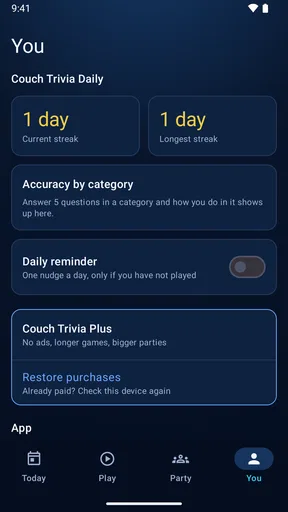
Another sensible choice is to keep purchase decisions separate from the social flow. Since optional in-app items are available, I would not let guests make purchases casually while passing around a device. A host can check those options beforehand and keep the session focused on playing. That is especially useful at family gatherings, where younger players may be sharing a phone or tablet with an adult.
Long-term verdict: useful when the room wants trivia
Hey there, trivia buffs! If you’re anything like me, you love a good challenge and a chance to show off your random knowledge skills. Well, let me introduce you to your new favorite party game: Couch Trivia Quiz. It’s a delightful app that turns your living room into a full-blown quiz show. I took it for a spin, and here’s what I found.
First off, the game is super easy to set up. You can download it from your favorite app store, whether you’re team Android or iOS. Once installed, Couch Trivia Quiz quickly connects to your smart TV or tablet, making it perfect for those impromptu gatherings. No need to spend half an hour explaining the rules—just open the app, and you’re ready to roll!
Gameplay That Keeps You Hooked
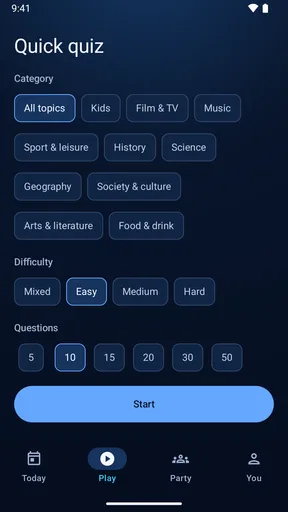
The gameplay is where this app truly shines. It offers a range of quiz categories, from pop culture to science, so there’s something for everyone. Whether you’re a movie buff or a history nerd, you’ll find a category that tickles your fancy. What’s more, the questions are a balanced mix of easy, medium, and hard, ensuring that everyone can participate without feeling left out.
One of the coolest features is its multiplayer mode. You can play against friends or family in real-time, battling it out to see who’s the ultimate trivia champion. The app also keeps track of scores, so there’s no arguing over who answered what. It’s all right there in black and white.
Aesthetic and Usability
Now, I’m a sucker for a good-looking app, and Couch Trivia Quiz doesn’t disappoint. The interface is sleek and intuitive, with vibrant colors that keep the energy up. The developers clearly put a lot of thought into the user experience, which makes navigating through the app a breeze. Even your tech-challenged aunt can join the fun without any hiccups.
In terms of usability, I found the app to be very responsive. There’s nothing worse than a laggy game, and thankfully, that’s not an issue here. Questions load quickly, and the app runs smoothly, even during intense trivia battles.
Why It’s Perfect for Parties
Picture this: You’ve got friends over, snacks are flowing, and you want to break the ice. This is where Couch Trivia Quiz comes in. It’s the perfect party starter, sparking friendly competition and laughter. Plus, it’s suitable for all ages, making it a hit at family gatherings too.
One feature I love is the ability to customize your trivia experience. You can create your own quizzes, adding a personal touch to the game. Whether it’s inside jokes or questions about shared memories, this feature makes the game even more engaging and unique.
Final Thoughts
So, is Couch Trivia Quiz worth downloading? Absolutely! It’s a fun, interactive way to bring people together, and it’s packed with features that keep the game fresh and exciting. Whether you’re hosting a party or just chilling with your family, this app is sure to be a crowd-pleaser.
If you’re ready to test your knowledge and have a blast doing it, head over to your app store and download Couch Trivia Quiz now. Trust me, you won’t be disappointed!
That is the lasting-space test I’d use: does your group ask to play again, and does the simple TV-and-phone setup suit the way you actually gather? If yes, this free trivia game can earn an occasional place in the rotation without demanding a dedicated game night. If interest drops after the first try, there is little reason to force a habit. I’d recommend giving it a chance when the room is already in the mood for questions, then letting the group—not the novelty—decide whether it stays.
Pros
- Engaging multiplayer experience
- Variety of trivia categories
- User-friendly interface
- Regular updates with new content
- Fun
- competitive gameplay
Cons
- Requires internet connection
- Limited solo play options
- Ads can be intrusive
- In-app purchases for extra features
- Occasional connectivity issues
FAQs for Couch Trivia Quiz party game
What is Couch Trivia Quiz party game?
Couch Trivia Quiz is an engaging party game designed for both Android and iOS platforms. It offers a variety of trivia questions across multiple categories, allowing players to test their knowledge while having fun with friends and family. The game is perfect for gatherings and can be played in teams or individually.
How many players can participate in Couch Trivia Quiz at once?
Couch Trivia Quiz accommodates multiple players, making it ideal for parties and group gatherings. Players can form teams or compete individually. The game supports up to eight players simultaneously, ensuring everyone can join in the fun and challenge their trivia knowledge.
What types of trivia categories are available in the game?
Couch Trivia Quiz features a wide range of trivia categories to cater to diverse interests. Players can choose from topics such as history, science, pop culture, sports, and more. This variety ensures that players of all ages and preferences can find questions that pique their interest.
Is an internet connection required to play Couch Trivia Quiz?
While Couch Trivia Quiz can be played offline, certain features, such as updates and leaderboard access, require an internet connection. To enjoy the full experience, including access to the latest questions and online multiplayer modes, a stable internet connection is recommended.
Are there in-app purchases or ads in Couch Trivia Quiz?
Couch Trivia Quiz is free to download and play, but it includes optional in-app purchases. These purchases can enhance the gaming experience by unlocking additional question packs or removing ads. Ads are present in the free version, but they are designed to be minimally intrusive to maintain a smooth gameplay experience.


